

Close Menu
AdimorahBlogAdimorahBlog
  • Home
  • ABOUT US
  • CONTACT US
  • PRIVACY POLICY
  • XIAOMI
    • Xiaomi apps
      • POCO beta testers
    • Xiaomi News
    • Xiaomi Pad
    • Redmi
    • POCO
  • MIUI updates
    • MIUI 14
    • MIUI beta testers
    • MIUI launcher
  • Google
    • Google Camera
    • Pixel
    • Google chrome
  • Samsung
    • OneUI news
    • Samsung News
    • Samsung Galaxy Watch
  • Android
    • Android 13
    • Android 14
    • Android 15
    • Android Auto
  • Smartphone
    • Apple
    • Samsung
    • Pixel
    • XIAOMI
    • Redmi
    • POCO
    • OnePlus
    • Sony
    • Fairphone
    • OnePlus
  • How To
  • Gaming
    • Video gaming
Facebook X (Twitter) Instagram
AdimorahBlogAdimorahBlog
Subscribe
  • Home
  • ABOUT US
  • CONTACT US
  • PRIVACY POLICY
  • XIAOMI
    • Xiaomi apps
      • POCO beta testers
    • Xiaomi News
    • Xiaomi Pad
    • Redmi
    • POCO
  • MIUI updates
    • MIUI 14
    • MIUI beta testers
    • MIUI launcher
  • Google
    • Google Camera
    • Pixel
    • Google chrome
  • Samsung
    • OneUI news
    • Samsung News
    • Samsung Galaxy Watch
  • Android
    • Android 13
    • Android 14
    • Android 15
    • Android Auto
  • Smartphone
    • Apple
    • Samsung
    • Pixel
    • XIAOMI
    • Redmi
    • POCO
    • OnePlus
    • Sony
    • Fairphone
    • OnePlus
  • How To
  • Gaming
    • Video gaming
AdimorahBlogAdimorahBlog
Home | MIUI update | Xiaomi News | Samsung Galaxy Watch | How to Check for Updates on the Galaxy Watch 4
Samsung Galaxy Watch

How to Check for Updates on the Galaxy Watch 4

Frank OchasoBy Frank OchasoFebruary 27, 2022Updated:February 28, 2022No Comments3 Mins Read
Facebook Twitter Pinterest LinkedIn Tumblr Email
How to Check for Updates on the Galaxy Watch 4
Share
Facebook Twitter LinkedIn Pinterest Email

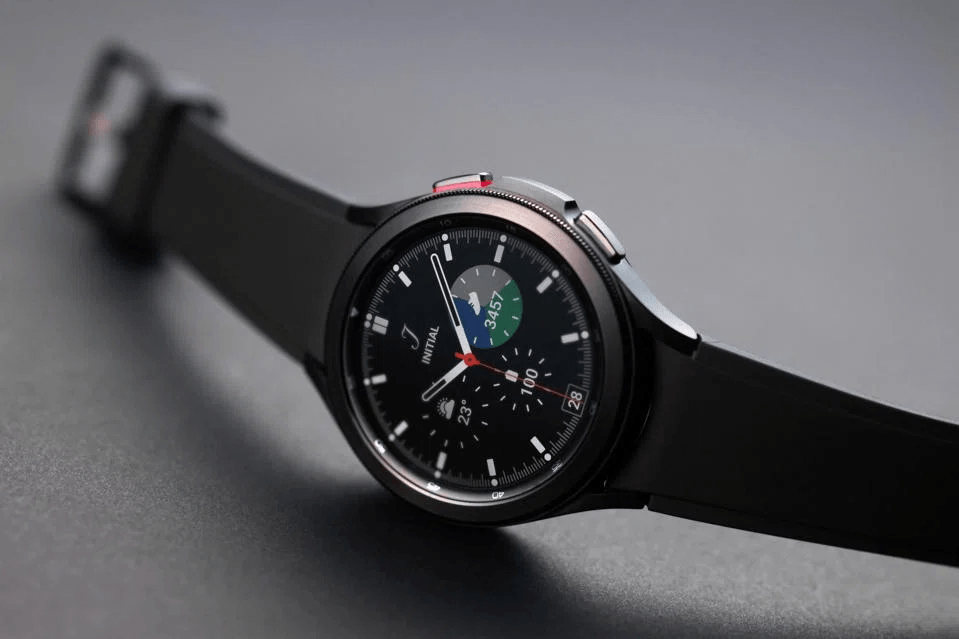
The Galaxy Watch 4 has received a lot of frequent updates since its launch in late August of 2021. The majority of these were software updates to increase stability and performance, ensuring that the Watch 4 runs at maximum speed and efficiency.
How to Check for Updates on the Galaxy Watch 4

Two major content updates have been released since then. These updates include new features such as additional exercises, improved sleep tracking, and more. It’s difficult to pinpoint a precise release date for the Galaxy Watch 4 and its updates, but based on what has been seen so far, Samsung appears to be working hard to ensure that the Galaxy Watch 4 is well updated.

advertisement

This guide will walk you through the steps on how to check for updates on the Galaxy Watch. So, stay tuned as we get started.

Checking Updates on the Galaxy Watch 4

There are two ways to check for updates on the Galaxy Watch 4. Let’s have a look at each of them below;

1. Using your Smartwatch 

First, you can use the smartwatch itself. Here’s how to update your Galaxy Watch directly from the watch:

  • Tap the Settings app by swiping down from the smartwatch.
  • Scroll to the bottom of the Software update page. It should be tapped.
  • The Galaxy Watch will begin to look for a new update. You’ll be prompted to install the update if one is available. Start the installation process.
  • After the installation is complete, connect it to the charger just in case.

Also read: How to Create a ZIP File for Photos and Videos on an iPhone 

2. Using your Android Device

If you’d rather update the Galaxy Watch 4 on your Android device, follow the steps below:

  • On your Android device, open the Galaxy Wearable app.
  • Make sure your watch is selected before going to the Watch settings section.
  • Scroll to the bottom of the page and select Watch software update.
  • Your smartphone will begin looking for a new Galaxy Watch 4 update. You’ll be given two alternatives if one is available: install overnight or install now. Select one.
  • If you select “Install overnight,” your phone will download the update for installation during the night. But if you choose “Install now,” your phone will download and install the update right away. 

Final Words

That concludes everything you need to know about how to check updates on the Galaxy Watch 4. However, it’s worth noting that content updates on the Galaxy Watch 4 take longer – anything from 5 to 15 minutes. Whatever method you use to update your Galaxy Watch 4, make sure you check it regularly.

Galaxy Watch 4 How to Samsung Galaxy watch Updates
Share. Facebook Twitter Pinterest LinkedIn Tumblr Email
Frank Ochaso

Related Posts

[Update] Xiaomi MIUI Theme app: Download and install the latest version

June 4, 2025

May 2025 security patch update for Pixel phones is now rolling out

May 6, 2025

How To Track Someone On Google Maps in 2025

April 25, 2025
Add A Comment
Leave A Reply

Recent Posts
  • How to Use a Free Online Image Converter Easily
  • Xiaomi starts rolling out stable Android 16 based on HyperOS 2
  • Galaxy A36 Android 16-based One UI 8 build spotted
  • Galaxy A15 One UI 8 build spotted on Samsung servers
  • Xiaomi 13T HyperOS 2.2 is now available for download
About Us
AdimorahBlog was founded in 2017 and has grown into a global brand in the past years. As we continue to expand, we will keep providing our readers with the best coverage on Xiaomi HyperOS updates and smartphone latest Android OS updates. We strive to become the update hub for all smartphones. Contact Us: info@adimorahblog.com
AdimorahBlog
Facebook X (Twitter) YouTube Telegram
  • Home
  • CONTACT US
  • ABOUT US
  • PRIVACY POLICY
© 2026 AdimorahBlog. Designed by ThemeSphere.

Type above and press Enter to search. Press Esc to cancel.