

Close Menu
AdimorahBlogAdimorahBlog
  • Home
  • ABOUT US
  • CONTACT US
  • PRIVACY POLICY
  • XIAOMI
    • Xiaomi apps
      • POCO beta testers
    • Xiaomi News
    • Xiaomi Pad
    • Redmi
    • POCO
  • MIUI updates
    • MIUI 14
    • MIUI beta testers
    • MIUI launcher
  • Google
    • Google Camera
    • Pixel
    • Google chrome
  • Samsung
    • OneUI news
    • Samsung News
    • Samsung Galaxy Watch
  • Android
    • Android 13
    • Android 14
    • Android 15
    • Android Auto
  • Smartphone
    • Apple
    • Samsung
    • Pixel
    • XIAOMI
    • Redmi
    • POCO
    • OnePlus
    • Sony
    • Fairphone
    • OnePlus
  • How To
  • Gaming
    • Video gaming
Facebook X (Twitter) Instagram
AdimorahBlogAdimorahBlog
Subscribe
  • Home
  • ABOUT US
  • CONTACT US
  • PRIVACY POLICY
  • XIAOMI
    • Xiaomi apps
      • POCO beta testers
    • Xiaomi News
    • Xiaomi Pad
    • Redmi
    • POCO
  • MIUI updates
    • MIUI 14
    • MIUI beta testers
    • MIUI launcher
  • Google
    • Google Camera
    • Pixel
    • Google chrome
  • Samsung
    • OneUI news
    • Samsung News
    • Samsung Galaxy Watch
  • Android
    • Android 13
    • Android 14
    • Android 15
    • Android Auto
  • Smartphone
    • Apple
    • Samsung
    • Pixel
    • XIAOMI
    • Redmi
    • POCO
    • OnePlus
    • Sony
    • Fairphone
    • OnePlus
  • How To
  • Gaming
    • Video gaming
AdimorahBlogAdimorahBlog
Home | MIUI update | Xiaomi News | Android | How To Create Android Emoji Wallpapers
Android

How To Create Android Emoji Wallpapers

Adimorah JudeBy Adimorah JudeJune 19, 2023No Comments2 Mins Read
Facebook Twitter Pinterest LinkedIn Tumblr Email
How To Create Android Emoji Wallpapers
Share
Facebook Twitter LinkedIn Pinterest Email

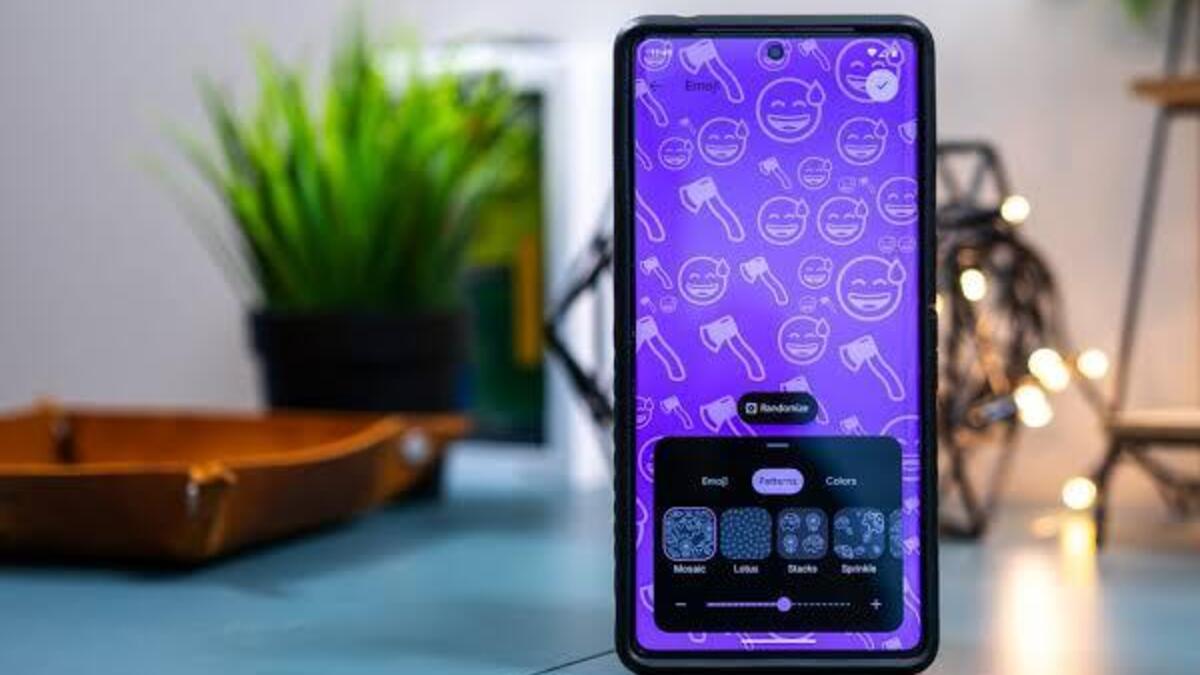
Emoji Wallpapers have arrived on Android 14, adding a vibrant and lively touch to the user experience. This feature, introduced during Google I/O 2023, is available for users running Android 14 Beta 3 or later. With a few easy steps, you can create and set Emoji Wallpapers that showcase up to 14 emojis in a style and color of your choice. 
How To Create Android Emoji Wallpapers

These dynamic wallpapers even react to taps on the homescreen’s pages. So, if you’re looking forward to knowing how to create Android emoji wallpapers, then this guide is for you!. Below, we’ll show you how to go about that. 

advertisement

Step-by-Step Guide to Creating Android Emoji Wallpapers

  • Ensure that your device is running Android 14 Beta 3 or a newer version.
  • Tap and hold on the homescreen of your Android device.
  • Select “Wallpaper & style” from the options that appear.
  • Tap on “More wallpapers” to explore additional wallpaper categories.
  • Look for and select “Emoji Workshop” from the available options.
    • Note: If you are running Android 14 Beta 2 or an earlier version, Emoji Wallpapers may not be available.
  • Take control of the customization process. Begin by tapping “Edit Emoji” to choose the emojis you want to include in your wallpaper.
  • Next, select a pattern that will determine the arrangement of the emojis on the wallpaper.
  • Choose a color scheme that suits your preference.
    • Note: You can adjust the size and density of the emojis using the slider under the “Patterns” tab.
  • Once you are satisfied with your customization, tap “Set Wallpaper” to apply the Emoji Wallpaper to your homescreen.

Final Words

There you have it on how to create emoji wallpapers in Android 14 Beta 3 and later versions. As you can see, the steps are pretty easy. So, embrace the vast possibilities and let your imagination run wild as you create unique and vibrant emoji wallpapers!

To get our latest news once they’re published, please follow us on Google News, Telegram, Facebook, and Twitter. We cover general tech news and are the first to break the latest MIUI update releases. Also, you get issues-solving “How To” posts from us. 

Android Android 14 Emoji wallpapers How to
Share. Facebook Twitter Pinterest LinkedIn Tumblr Email
Adimorah Jude
  • Website
  • Facebook
  • X (Twitter)

I'm a passionate tech blogger.

Related Posts

Android Auto 14.7 beta update hints at a new feature

June 30, 2025

Android Auto 14.6 update is now available for download

June 16, 2025

Android 16 QPR1 Beta 1.1 update is now available

June 5, 2025
Add A Comment
Leave A Reply

Recent Posts
  • How to Use a Free Online Image Converter Easily
  • Xiaomi starts rolling out stable Android 16 based on HyperOS 2
  • Galaxy A36 Android 16-based One UI 8 build spotted
  • Galaxy A15 One UI 8 build spotted on Samsung servers
  • Xiaomi 13T HyperOS 2.2 is now available for download
About Us
AdimorahBlog was founded in 2017 and has grown into a global brand in the past years. As we continue to expand, we will keep providing our readers with the best coverage on Xiaomi HyperOS updates and smartphone latest Android OS updates. We strive to become the update hub for all smartphones. Contact Us: info@adimorahblog.com
AdimorahBlog
Facebook X (Twitter) YouTube Telegram
  • Home
  • CONTACT US
  • ABOUT US
  • PRIVACY POLICY
© 2026 AdimorahBlog. All Rights Reserved

Type above and press Enter to search. Press Esc to cancel.