

Close Menu
AdimorahBlogAdimorahBlog
  • Home
  • ABOUT US
  • CONTACT US
  • PRIVACY POLICY
  • XIAOMI
    • Xiaomi apps
      • POCO beta testers
    • Xiaomi News
    • Xiaomi Pad
    • Redmi
    • POCO
  • MIUI updates
    • MIUI 14
    • MIUI beta testers
    • MIUI launcher
  • Google
    • Google Camera
    • Pixel
    • Google chrome
  • Samsung
    • OneUI news
    • Samsung News
    • Samsung Galaxy Watch
  • Android
    • Android 13
    • Android 14
    • Android 15
    • Android Auto
  • Smartphone
    • Apple
    • Samsung
    • Pixel
    • XIAOMI
    • Redmi
    • POCO
    • OnePlus
    • Sony
    • Fairphone
    • OnePlus
  • How To
  • Gaming
    • Video gaming
Facebook X (Twitter) Instagram
AdimorahBlogAdimorahBlog
Subscribe
  • Home
  • ABOUT US
  • CONTACT US
  • PRIVACY POLICY
  • XIAOMI
    • Xiaomi apps
      • POCO beta testers
    • Xiaomi News
    • Xiaomi Pad
    • Redmi
    • POCO
  • MIUI updates
    • MIUI 14
    • MIUI beta testers
    • MIUI launcher
  • Google
    • Google Camera
    • Pixel
    • Google chrome
  • Samsung
    • OneUI news
    • Samsung News
    • Samsung Galaxy Watch
  • Android
    • Android 13
    • Android 14
    • Android 15
    • Android Auto
  • Smartphone
    • Apple
    • Samsung
    • Pixel
    • XIAOMI
    • Redmi
    • POCO
    • OnePlus
    • Sony
    • Fairphone
    • OnePlus
  • How To
  • Gaming
    • Video gaming
AdimorahBlogAdimorahBlog
Home | MIUI update | Xiaomi News | Snapchat | How to tell If someone checked your location on Snapchat
Snapchat

How to tell If someone checked your location on Snapchat

Adimorah JudeBy Adimorah JudeMarch 15, 2022Updated:June 8, 2022No Comments3 Mins Read
Facebook Twitter Pinterest LinkedIn Tumblr Email
Google map tracking
Share
Facebook Twitter LinkedIn Pinterest Email

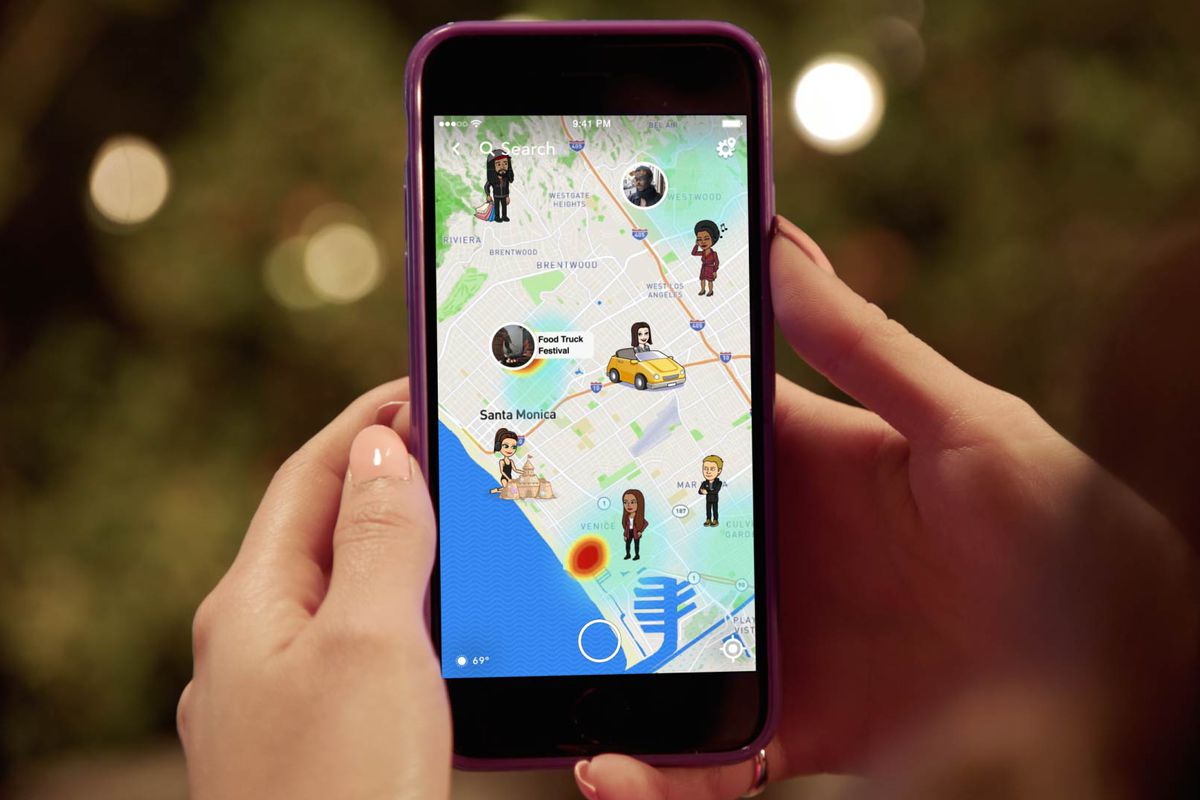
If you’re a regular Snapchat user, you’ve probably noticed a map on the app. This map has a one-o feature. When you visit a location, your Bitmoji avatar appears on this map. As a result, your followers will be aware of your whereabouts. This option can be turned off if you wish to keep your trips secret. But what if you want to know who has seen your Snapchat location?

How To Tell If Someone Checked Your Location On Snapchat

In this guide, we’ll check out what the ‘Snap Map’ is, as well as how to tell if someone checked your location on Snapchat. So, stay tuned as we get started.

advertisement

Reasons why one might want to know who has viewed their location on Snapchat

When you post personal information on the internet, you have the right to know who sees it. The privacy features of an application might sometimes revoke this right. The same can be said for the site. It provides you a sense of security to know who has viewed your location on a social networking platform. It can also alert you to any stalking activity.

Here’s a list of reasons why you would wish to know who has viewed your Snapchat location:

  • Check to see if any of your pals are in the area so you can hang out together.
  • To keep an eye out for anything out of the ordinary.
  • To see if someone you wanted to see the location has seen it or not.

Here is How To Tell If Someone Checked Your Location On Snapchat

You can’t see who has viewed your Snapchat location, but you may hide or restrict what Snapchat reports to others.

When Snap Maps first launched, several users were outraged because they felt their privacy had been violated, but Snapchat quickly addressed these concerns by enhancing its privacy settings.

You have three options for controlling what Snapchat reports about your location:

  • With privacy turned on, you can use Snap Map to share your location or travels.
  • You can disable the feature entirely and prevent it from running.
  • You can deceive the app into reporting false locations.

Also read: How to Save Snapchat Videos on Android and iPhone

How to Adjust Snap Map Privacy

Despite the fact that Snap Map allows you to share your position with your friends and see where they are when they open the app, you may wish to limit who sees it. Follow these procedures to get to the SnapMap privacy settings:

  • In the lower left corner of the screen, tap the “Map” symbol.
  • In the top right corner of the screen, tap the “Settings” symbol.
  • Turn on “Ghost Mode” to hide your location from others, or pick “My Friends,” “My Friends, Except,” or “Only These Friends” to limit who can see your location.

Final Words

That completes everything you need to know on how to tell if someone checked your location on Snapchat. Do you find this guide quite helpful? If so, don’t hesitate to drop your comments below!

How to Snap Maps Snapchat
Share. Facebook Twitter Pinterest LinkedIn Tumblr Email
Adimorah Jude
  • Website
  • Facebook
  • X (Twitter)

I'm a passionate tech blogger.

Related Posts

How to search and add friends on Snapchat by location

May 26, 2025

How To Track Someone On Google Maps in 2025

April 25, 2025

How to Fix Cannot Connect to App Store on iPhone or iPad

March 2, 2025
Add A Comment
Leave A Reply

Recent Posts
  • How to Use a Free Online Image Converter Easily
  • Xiaomi starts rolling out stable Android 16 based on HyperOS 2
  • Galaxy A36 Android 16-based One UI 8 build spotted
  • Galaxy A15 One UI 8 build spotted on Samsung servers
  • Xiaomi 13T HyperOS 2.2 is now available for download
About Us
AdimorahBlog was founded in 2017 and has grown into a global brand in the past years. As we continue to expand, we will keep providing our readers with the best coverage on Xiaomi HyperOS updates and smartphone latest Android OS updates. We strive to become the update hub for all smartphones. Contact Us: info@adimorahblog.com
AdimorahBlog
Facebook X (Twitter) YouTube Telegram
  • Home
  • CONTACT US
  • ABOUT US
  • PRIVACY POLICY
© 2026 AdimorahBlog. All Rights Reserved

Type above and press Enter to search. Press Esc to cancel.