

Close Menu
AdimorahBlogAdimorahBlog
  • Home
  • ABOUT US
  • CONTACT US
  • PRIVACY POLICY
  • XIAOMI
    • Xiaomi apps
      • POCO beta testers
    • Xiaomi News
    • Xiaomi Pad
    • Redmi
    • POCO
  • MIUI updates
    • MIUI 14
    • MIUI beta testers
    • MIUI launcher
  • Google
    • Google Camera
    • Pixel
    • Google chrome
  • Samsung
    • OneUI news
    • Samsung News
    • Samsung Galaxy Watch
  • Android
    • Android 13
    • Android 14
    • Android 15
    • Android Auto
  • Smartphone
    • Apple
    • Samsung
    • Pixel
    • XIAOMI
    • Redmi
    • POCO
    • OnePlus
    • Sony
    • Fairphone
    • OnePlus
  • How To
  • Gaming
    • Video gaming
Facebook X (Twitter) Instagram
AdimorahBlogAdimorahBlog
Subscribe
  • Home
  • ABOUT US
  • CONTACT US
  • PRIVACY POLICY
  • XIAOMI
    • Xiaomi apps
      • POCO beta testers
    • Xiaomi News
    • Xiaomi Pad
    • Redmi
    • POCO
  • MIUI updates
    • MIUI 14
    • MIUI beta testers
    • MIUI launcher
  • Google
    • Google Camera
    • Pixel
    • Google chrome
  • Samsung
    • OneUI news
    • Samsung News
    • Samsung Galaxy Watch
  • Android
    • Android 13
    • Android 14
    • Android 15
    • Android Auto
  • Smartphone
    • Apple
    • Samsung
    • Pixel
    • XIAOMI
    • Redmi
    • POCO
    • OnePlus
    • Sony
    • Fairphone
    • OnePlus
  • How To
  • Gaming
    • Video gaming
AdimorahBlogAdimorahBlog
Home | MIUI update | Xiaomi News | Google | How to disable Hey Google on Galaxy Watch 4
Google

How to disable Hey Google on Galaxy Watch 4

Onyebuchi UcheBy Onyebuchi UcheJune 1, 2022No Comments2 Mins Read
Facebook Twitter Pinterest LinkedIn Tumblr Email
Check Google fit and Fitbit stats
Share
Facebook Twitter LinkedIn Pinterest Email

The sleek Samsung wearable, Galaxy Watch 4 has been getting a lot of updates to its Google Assistant recently plus a few other software enhancements. However, with the addition of a tweak to the Google Assistant on the Watch, it has a shortcoming and some users will want to disable Hey Google on Galaxy Watch 4. 
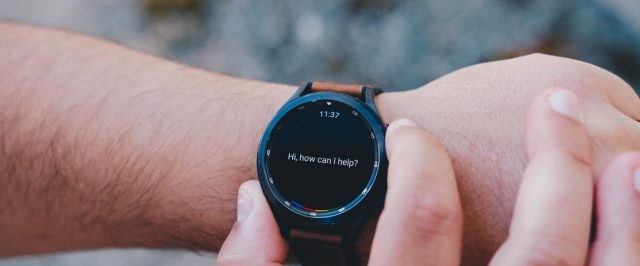
Disable Hey Google on Galaxy Watch 4

The noticed drawback to this update is the negative effect on battery life as a result of the “always listening” feature. According to some users, the “Hey Google” from Google Assistant can reduce the battery life by about 20 percent within 2 to 6 hours. This reason makes most people want to disable Hey Google on Galaxy Watch 4. 

advertisement

Well, while you disable Hey Google on Galaxy Watch 4, there is still another method you can turn on your Google Assistant. By another method, we mean using a physical button like a home key. This can be done by navigating to your Settings app on your wearable and then moving over to Advanced features, you can now customize how you want your home key to function.

In addition, you can still turn on the Google Assistant by moving over to the app itself by swiping up and clicking on the Google Assistant. When you disable Hey Google on Galaxy Watch 4 and use the mentioned tips, you get to save a decent amount of battery life.

Meanwhile, steps to disable Hey Google on Galaxy Watch 4
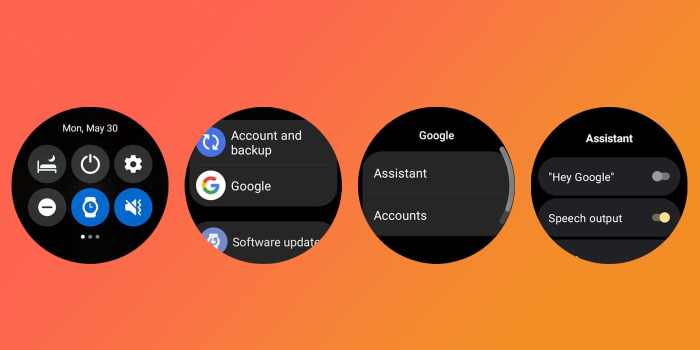
Disable Hey Google on Galaxy Watch 4

On your wearable, move to Settings and then swipe down and tap on the Settings cog. Having done this, scroll down and tap on Google, then tap on Assistant. You can now tap on Hey Google to toggle it off. 

Via

Battery drain Galaxy Watch 4 Google Assistant
Share. Facebook Twitter Pinterest LinkedIn Tumblr Email
Onyebuchi Uche

Related Posts

Android Auto 14.7 beta update hints at a new feature

June 30, 2025

A new update starts rolling out for Pixel users

June 25, 2025

Android Auto 14.6 update is now available for download

June 16, 2025
Add A Comment
Leave A Reply

Recent Posts
  • How to Use a Free Online Image Converter Easily
  • Xiaomi starts rolling out stable Android 16 based on HyperOS 2
  • Galaxy A36 Android 16-based One UI 8 build spotted
  • Galaxy A15 One UI 8 build spotted on Samsung servers
  • Xiaomi 13T HyperOS 2.2 is now available for download
About Us
AdimorahBlog was founded in 2017 and has grown into a global brand in the past years. As we continue to expand, we will keep providing our readers with the best coverage on Xiaomi HyperOS updates and smartphone latest Android OS updates. We strive to become the update hub for all smartphones. Contact Us: info@adimorahblog.com
AdimorahBlog
Facebook X (Twitter) YouTube Telegram
  • Home
  • CONTACT US
  • ABOUT US
  • PRIVACY POLICY
© 2026 AdimorahBlog. Designed by ThemeSphere.

Type above and press Enter to search. Press Esc to cancel.