


Close Menu
AdimorahBlogAdimorahBlog
  • Home
  • ABOUT US
  • CONTACT US
  • PRIVACY POLICY
  • XIAOMI
    • Xiaomi apps
      • POCO beta testers
    • Xiaomi News
    • Xiaomi Pad
    • Redmi
    • POCO
  • MIUI updates
    • MIUI 14
    • MIUI beta testers
    • MIUI launcher
  • Google
    • Google Camera
    • Pixel
    • Google chrome
  • Samsung
    • OneUI news
    • Samsung News
    • Samsung Galaxy Watch
  • Android
    • Android 13
    • Android 14
    • Android 15
    • Android Auto
  • Smartphone
    • Apple
    • Samsung
    • Pixel
    • XIAOMI
    • Redmi
    • POCO
    • OnePlus
    • Sony
    • Fairphone
    • OnePlus
  • How To
  • Gaming
    • Video gaming
Facebook X (Twitter) Instagram
AdimorahBlogAdimorahBlog
Subscribe
  • Home
  • ABOUT US
  • CONTACT US
  • PRIVACY POLICY
  • XIAOMI
    • Xiaomi apps
      • POCO beta testers
    • Xiaomi News
    • Xiaomi Pad
    • Redmi
    • POCO
  • MIUI updates
    • MIUI 14
    • MIUI beta testers
    • MIUI launcher
  • Google
    • Google Camera
    • Pixel
    • Google chrome
  • Samsung
    • OneUI news
    • Samsung News
    • Samsung Galaxy Watch
  • Android
    • Android 13
    • Android 14
    • Android 15
    • Android Auto
  • Smartphone
    • Apple
    • Samsung
    • Pixel
    • XIAOMI
    • Redmi
    • POCO
    • OnePlus
    • Sony
    • Fairphone
    • OnePlus
  • How To
  • Gaming
    • Video gaming
AdimorahBlogAdimorahBlog
Home | MIUI update | Xiaomi News | X (Twitter) | How to download Twitter account history data
X (Twitter)

How to download Twitter account history data

Onyebuchi UcheBy Onyebuchi UcheNovember 19, 2022No Comments2 Mins Read
Facebook Twitter Pinterest LinkedIn Tumblr Email
How to create a twitter circle, Twitter's edit button
Share
Facebook Twitter LinkedIn Pinterest Email

You know it’s fun to have all the activities you’ve done on Twitter in one place. I mean, you can laugh and frown at some incidents so it can be worthwhile. But how do you go about that? You can download your Twitter account history data and it’s not a big task to carry out. Let’s walk you through all there is to the feature. 
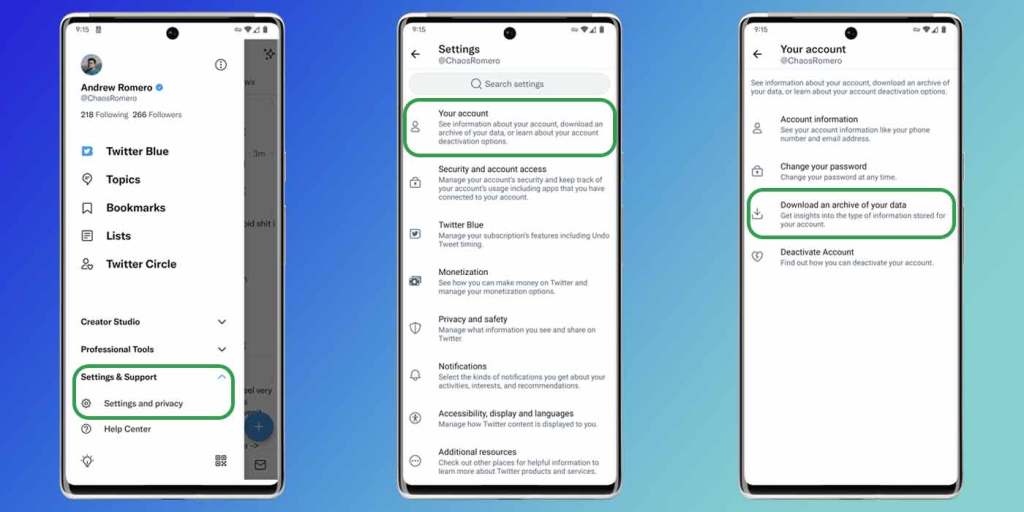
Twitter account history data

All we know of Twitter account history data

You can request your Twitter account history data and there’s a ton of information you can get from this move. Some of these are:

advertisement
  • Profile info
  • Direct messages
  • Moments
  • Tweet History
  • List of followers
  • List of accounts you’re following
  • Address book
  • Info on ads you’ve engaged
  • Interest and demographic information
  • The list you’ve created or followed
  • Media you’ve attached to your tweet. 

No doubt, you’ll get a ton of information when you download your Twitter account history data. But how do you go about that? First off, you’ll have to request your Twitter archive after which the Twitter servers will send an HTML or JSON file to you. 

  • Head over to Twitter on your mobile device
  • Tap on your Profile photo
  • Navigate to Settings & Support and then Settings and Privacy
  • Click on Your account
  • Tap on Download an archive of your data.
  • Then you’ll have to log in and do the verification via email or text. 

And that’s all there is to request. In about 24 hours, you’ll get notified that your Twitter account history data is ready to be downloaded. You can either choose to keep the ZIP file locked away(should you have a low storage space) or you can extract the files(of course this will take up your memory but it’s worthwhile). Well, that’s another addition to the lots of tweaks to Twitter recently. 

via 

Account history data Download
Share. Facebook Twitter Pinterest LinkedIn Tumblr Email
Onyebuchi Uche

Related Posts

Twitter X to make changes that might get it kicked out from Apple and Play store 

August 20, 2023

How To Bring Back Old Twitter Logo

July 31, 2023

Twitter is now X on Android and iOS 

July 30, 2023
Add A Comment
Leave A Reply

Recent Posts
  • How to Use a Free Online Image Converter Easily
  • Xiaomi starts rolling out stable Android 16 based on HyperOS 2
  • Galaxy A36 Android 16-based One UI 8 build spotted
  • Galaxy A15 One UI 8 build spotted on Samsung servers
  • Xiaomi 13T HyperOS 2.2 is now available for download
About Us
AdimorahBlog was founded in 2017 and has grown into a global brand in the past years. As we continue to expand, we will keep providing our readers with the best coverage on Xiaomi HyperOS updates and smartphone latest Android OS updates. We strive to become the update hub for all smartphones. Contact Us: info@adimorahblog.com
AdimorahBlog
Facebook X (Twitter) YouTube Telegram
  • Home
  • CONTACT US
  • ABOUT US
  • PRIVACY POLICY
© 2025 AdimorahBlog. Designed by ThemeSphere.

Type above and press Enter to search. Press Esc to cancel.